My Home Screen - March 2026
I like to check in on my home screen periodically and see how things evolve. This is my fourth post containing a home screen, you can see past versions under the homescreen tag.
Main Home Screen
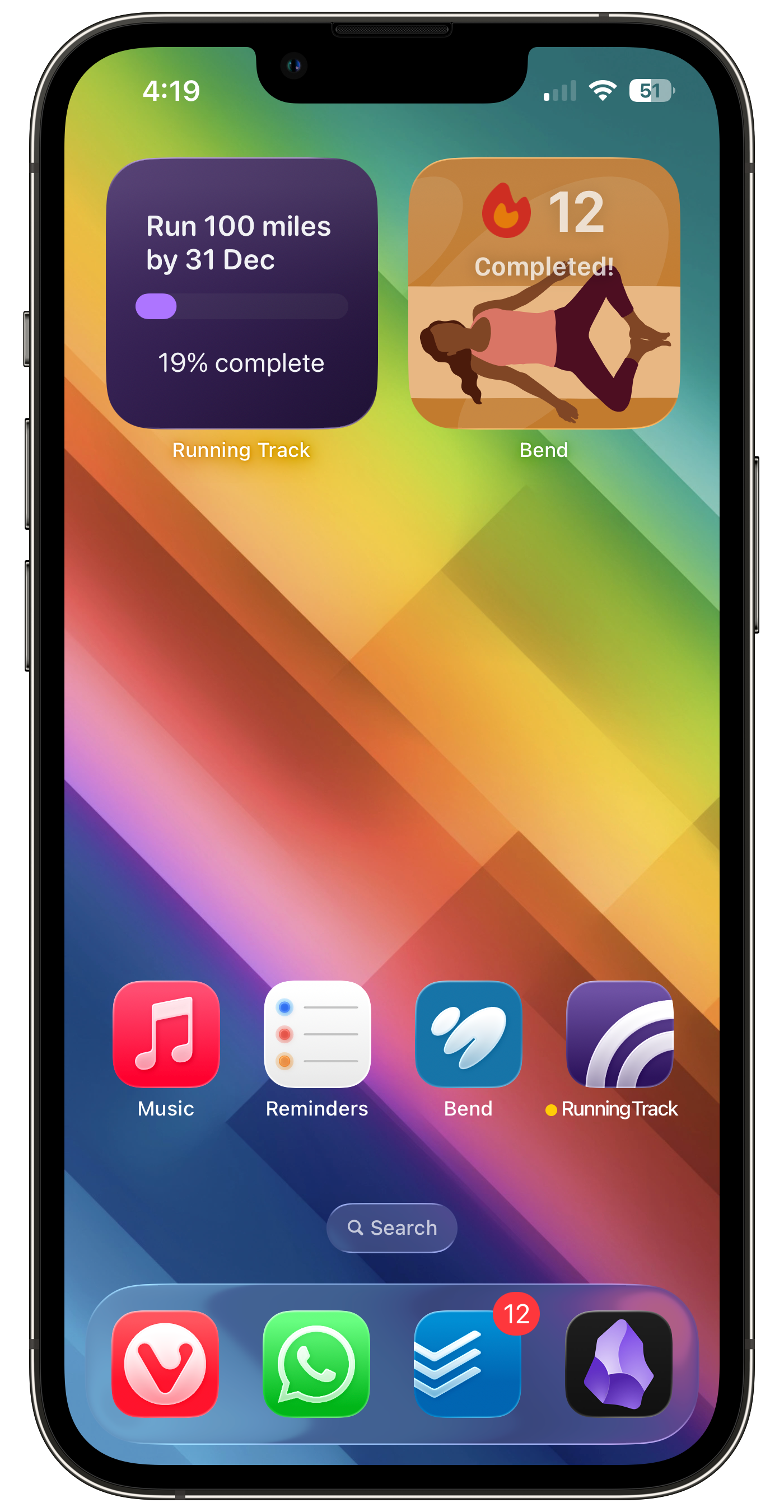
This is my daytime home screen. It’s changed quite a bit since last year.
Dock
My dock is exactly the same. I actually switched away from Vivaldi soon after my last post, since it’s not as fast as the native Safari app, and doesn’t support extensions. But I came back to it a couple of months ago, for exactly the same reasons as last year (quoted below), and I’m a lot happier with it now.
I replaced Safari with Vivaldi. There are a few reasons, which I won't go too deeply into (I have another post in the works for that rabbit hole), but to sum it up, I'm trying to avoid giving money or data to big US companies, where I can.
Widget Changes
- I still have two small widgets at the top. I find it really useful for giving me glanceable information, and the top space is rubbish for app icons because it’s too far to reach.
- I’ve replaced Google Calendar’s widget, which now lives on the widgets screen one swipe to the left of the home screen, with one for Bend, the workout app. I’m still unsure about this. I like having my Calendar there, but it looks terrible. I’m planning more widgets for Running Track so that will probably replace Bend.
- And talking of Running Track, the Goal widget (coming in the next release) has taken the place of Albums. Albums looks nice, but I was fed up seeing the same album covers over and over, and too lazy to build a bigger library. And the Running Track goal widget is really helping to motivate me to get out and run, which is a big part of why I built it in the first place.
App Changes
I now only have 4 app icons, down from 12 last year. I only have apps that I want to encourage myself to use now; last year’s layout made it easy to get sidetracked. As part of getting to know how my ADHD brain works this last year, I’ve realised that minimising distractions is really important. So Ivory, Reeder, Mail etc are now in the App Library and I’ll open them when that’s my intention, rather than when I spot the icon.
- Music is still my music app of choice. I do go to Spotify sometimes, if there’s something I want to check out, or more commonly if my kids want to play something from K-Pop Demon Hunters... But my local library is more than 90% of my listening.
- Reminders has all my daily tasks and chores, things like watering the plants, taking out the bins, feeding the cats. Things I need to do daily, and have a habit of forgetting (sorry cats, although they're not the least bit shy in reminding me). I’ve separated these out from Todoist, because I found the large task list was overwhelming when it contained daily chores as well as actual work. Again, trying to work with my ADHD instead of pushing up against it. And it’s working great.
- I’ll also mention some bigger app changes here. Awesome Habits is gone, because that just felt like another task list, and I don’t need that. Headspace was an aspirational app that just wasn’t actually working for me. I’ve replaced Carrot Weather with the Met Office weather app, which is the only one I find to be reliable where I live, ugly as it is. And I’ve replaced Goodlinks with Raindrop.io, because I wanted a cross platform service rather than something that synced my saved links with iCloud.
Fitness Apps
I no longer have a dedicated row of fitness apps, but it’s one of the primary function of my phone now.
- Running Track is my app for setting goals and analysing my running data. I find it much better than any other running app I’ve used; I run with the Apple Watch Workouts app (which is terrible as of watchOS 26), then view my running data in Running Track.
- Bend is a great app for doing daily yoga stretches. It takes all the spiritual stuff out of yoga and just makes it easy to do stretches.
- Last year I struggled with Fitbod. I couldn’t find the time to use it. As it turns out, I was way too pessimistic, and now use it once or twice a week.
Night Focus Home Screen
I no longer have a dedicated home screen for other focus modes. I have a good setup now, so I change my wallpaper in the evening to be one featuring my kids, and tint it red in Sleep focus, but that’s the only difference from the screenshot above now.
If you liked this article, please consider buying me a coffee to support my writing.
Published on 31 March 2026